🎨 CAIPE UI - Web Interface
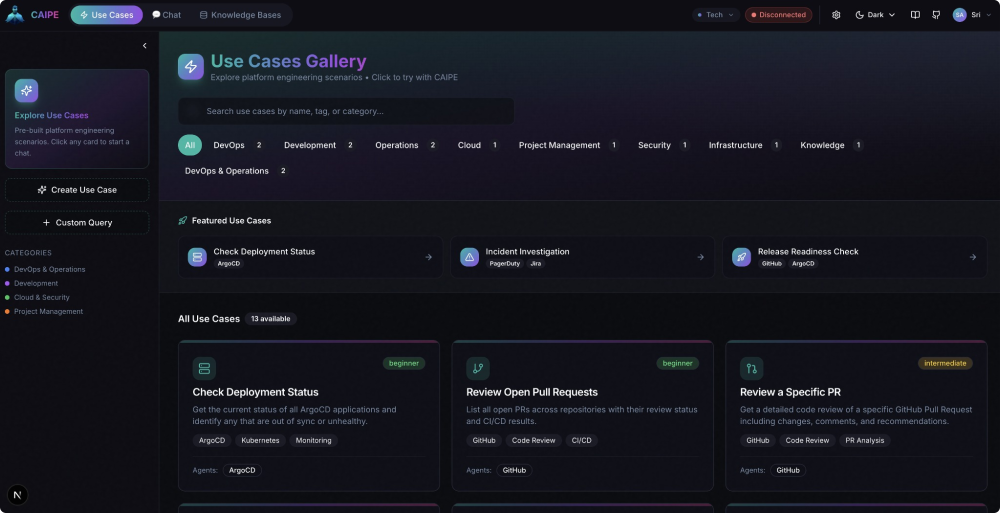
The CAIPE UI is a modern, interactive web interface for interacting with the CAIPE Multi-Agent System. Built with Next.js 15 and React 19, it provides an intuitive experience for executing agentic workflows, visualizing A2A protocol messages in real-time, and managing platform engineering tasks.
Overview
The CAIPE UI serves as the primary graphical interface for platform engineers, SREs, and developers to interact with AI agents. It features a sophisticated 3-panel layout that combines chat interaction, real-time message streaming visualization, and use case exploration.
Key Features
- 🎯 Use Cases Gallery: Pre-built scenarios for common platform engineering tasks
- 💬 Interactive Chat: Natural language interface to communicate with AI agents
- 📡 Real-time Streaming: Live visualization of A2A protocol messages and events
- 🔐 OAuth Authentication: Secure login with role-based access control
- 🎨 Modern UI/UX: Beautiful, responsive design with dark mode support
- 📊 A2UI Widget Support: Declarative UI components (buttons, forms, tables, etc.)
- 🔍 Message Inspection: Detailed view of A2A protocol events and artifacts
Quick Start
Using Make (Recommended)
# From repository root - installs dependencies and runs dev server
make caipe-ui

# Or run with Docker Compose (includes supervisor)
make caipe-ui-docker-compose
Visit http://localhost:3000
Using Docker Compose
# Start CAIPE supervisor + UI
COMPOSE_PROFILES=caipe-ui docker compose -f docker-compose.dev.yaml up

# Or with --profile flag
docker compose -f docker-compose.dev.yaml --profile caipe-ui up

# Or start everything (all agents + UI)
COMPOSE_PROFILES="all-agents,caipe-ui" docker compose -f docker-compose.dev.yaml up
Visit http://localhost:3000
Local Development
# From repository root
make caipe-ui-dev

# Or manually from ui directory
cd ui
npm install
npm run dev
Visit http://localhost:3000
Architecture
The UI follows a modern React architecture with these core principles:
┌─────────────────────────────────────────────────────────────┐
│                        CAIPE UI                             │
├─────────────┬─────────────────────┬─────────────────────────┤
│             │                     │                         │
│  Sidebar    │    Chat Panel       │   Context Panel        │
│  (Use Cases │    (Interaction)    │   (A2A Messages)       │
│   Gallery)  │                     │                         │
│             │                     │                         │
└─────────────┴─────────────────────┴─────────────────────────┘
       │               │                        │
       └───────────────┼────────────────────────┘
                       │
                   A2A Client
                       │
                       ▼
              CAIPE Supervisor
                  (Port 8000)
3-Panel Layout
-
Left Panel (Sidebar):
- Use cases gallery with categories
- Navigation and session management
- Quick access to common workflows
-
Center Panel (Chat):
- Main chat interface
- Message history
- Final output rendering with markdown support
- A2UI widget rendering
-
Right Panel (Context):
- Real-time A2A message stream
- Event filtering and inspection
- Artifact visualization
- Tool execution tracking
Technology Stack
Core Framework
- Framework: Next.js 15 (App Router, React Server Components)
- UI Library: React 19
- Styling: Tailwind CSS with custom design system
- Components: Radix UI primitives (accessible, unstyled)
- Icons: Lucide React
State & Data Flow
- State Management: Zustand (lightweight, scalable)
- Authentication: NextAuth.js (OAuth 2.0)
- A2A Protocol: Official @a2a-js/sdk (v0.3.9+) via A2ASDKClient wrapper
- Real-time Streaming: Server-Sent Events (SSE) via SDK's JsonRpcTransport
UI/UX
- Animations: Framer Motion (smooth transitions)
- Markdown Rendering: react-markdown with remark-gfm
- Syntax Highlighting: react-syntax-highlighter with Prism
- Graph Visualization: Sigma.js (@react-sigma/core) for knowledge graphs
- Resizable Panels: react-resizable-panels
Protocols & Standards
- A2A Protocol: Google's Agent-to-Agent protocol for inter-agent communication
- A2UI Specification: Declarative UI widgets (custom implementation following A2UI v0.8)
- AG-UI Compatible: Aligned with AG-UI patterns (CopilotKit)
- MCP Integration: Model Context Protocol for AI tool integration
See A2UI Integration Guide for detailed documentation on the A2UI implementation.
Note:
- A2A SDK: Uses official
@a2a-js/sdk(v0.3.9+) viaA2ASDKClientwrapper for standards-compliant agent communication - CopilotKit & AG-UI: Referenced as inspiration; UI uses custom widget implementations following A2UI and AG-UI specifications
Core Components
Authentication
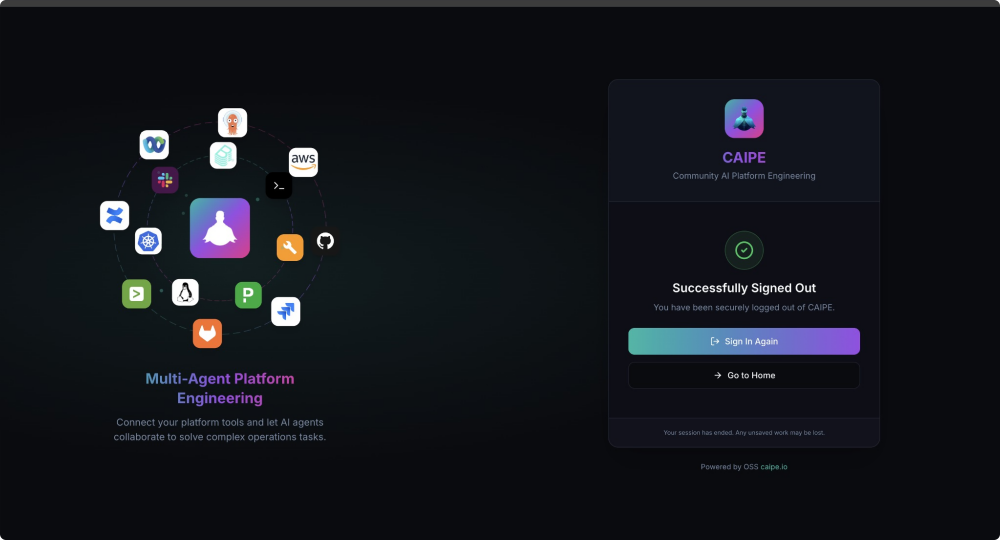
The UI supports multiple authentication modes:
- OAuth 2.0: Secure authentication with token management
- Development Mode: No authentication required (for local development)
- Session Management: Automatic token refresh and secure storage
Use Cases Gallery
Pre-configured scenarios for common platform engineering tasks:
- ☸️ Check Deployment Status - Monitor ArgoCD applications
- 🐙 Review Pull Requests - GitHub PR management
- 🚨 Incident Investigation - Multi-agent incident response
- 💰 AWS Cost Analysis - Cloud cost optimization
- 📊 Sprint Progress - Jira sprint tracking
- 🔄 On-Call Handoff - SRE handoff automation
- 🔒 Security Vulnerabilities - Security scanning and reporting
- 🎯 Cluster Health - Kubernetes resource monitoring
- 🚀 Release Readiness - Pre-deployment checks
- 📚 Documentation Search - RAG-powered knowledge search
A2A Protocol Visualization
Real-time visualization of A2A protocol events:
| Event Type | Description | Visual Indicator |
|---|---|---|
task | Task lifecycle events | 🔵 Blue badge with state |
artifact-update | Streaming content | 🟣 Purple badge with preview |
status-update | Final status | 🟢 Green badge with completion |
A2UI Widget Catalog
Declarative UI components for rich interactions:
- Button: Call-to-action buttons with variants
- Form: Input forms with validation
- Card: Content cards (default, outline, ghost)
- List: Ordered/unordered lists with status icons
- Table: Data tables with sorting and filtering
- Progress: Progress bars and indicators
- Select: Dropdown selection menus
- Input: Text input fields with validation
Configuration
Environment Variables
| Variable | Default (Dev) | Default (Docker) | Description |
|---|---|---|---|
CAIPE_URL | http://localhost:8000 | http://caipe-supervisor:8000 | CAIPE supervisor endpoint |
NEXT_PUBLIC_CAIPE_URL | Same as CAIPE_URL | Same as CAIPE_URL | Client-side accessible URL |
NEXTAUTH_URL | http://localhost:3000 | http://localhost:3000 | NextAuth base URL |
NEXTAUTH_SECRET | (required) | (required) | Secret for session encryption |
OAUTH_CLIENT_ID | (optional) | (optional) | OAuth client ID |
OAUTH_CLIENT_SECRET | (optional) | (optional) | OAuth client secret |
USECASE_STORAGE_TYPE | file | file | Storage backend: file or mongodb |
Authentication Setup
For production deployments, configure OAuth:
# Generate NextAuth secret
openssl rand -base64 32

# Set environment variables
export NEXTAUTH_SECRET="<generated-secret>"
export OAUTH_CLIENT_ID="<your-client-id>"
export OAUTH_CLIENT_SECRET="<your-client-secret>"
For development without authentication:
# Skip OAuth (development only)
export SKIP_AUTH=true
Use Case Storage
The UI supports two storage backends for user-created use cases:
File-based (Default) - No configuration needed
USECASE_STORAGE_TYPE=file
USECASE_STORAGE_PATH=./data/usecases.json
MongoDB (Production) - For scalable deployments
USECASE_STORAGE_TYPE=mongodb
MONGODB_URI=mongodb://localhost:27017/caipe
See Use Case Storage Configuration ADR for details.
Development
Project Structure
ui/
├── src/
│   ├── app/                    # Next.js app router
│   │   ├── api/                # API routes
│   │   ├── login/              # Login page
│   │   ├── logout/             # Logout handler
│   │   ├── unauthorized/       # Access denied page
│   │   ├── layout.tsx          # Root layout with providers
│   │   └── page.tsx            # Main 3-panel layout
│   ├── components/
│   │   ├── a2a/                # A2A protocol components
│   │   │   ├── A2AStreamPanel.tsx
│   │   │   ├── A2UIRenderer.tsx
│   │   │   ├── ContextPanel.tsx
│   │   │   └── widgets/        # A2UI widget library
│   │   ├── chat/               # Chat interface
│   │   │   ├── ChatPanel.tsx
│   │   │   ├── ChatInput.tsx
│   │   │   └── MessageList.tsx
│   │   ├── gallery/            # Use cases gallery
│   │   │   ├── UseCasesGallery.tsx
│   │   │   └── UseCaseCard.tsx
│   │   ├── layout/             # Layout components
│   │   │   └── Sidebar.tsx
│   │   └── ui/                 # Shared UI components
│   ├── hooks/                  # Custom React hooks
│   │   ├── use-a2a-streaming.ts
│   │   └── use-chat.ts
│   ├── lib/                    # Utilities and clients
│   │   ├── a2a-client.ts       # A2A protocol client
│   │   ├── a2a-sdk-client.ts   # SDK-based client
│   │   └── utils.ts            # Helper utilities
│   ├── store/                  # State management
│   │   └── chat-store.ts       # Zustand chat state
│   └── types/                  # TypeScript types
│       └── a2a.ts              # A2A protocol types
├── public/                     # Static assets
│   └── *.svg                   # Agent/tool icons
├── Dockerfile                  # Production Docker image
├── docker-compose.dev.yaml     # Development compose
└── package.json
Building for Production
# Build optimized production bundle
npm run build

# Run production server
npm start
Linting and Type Checking
# Run ESLint
npm run lint

# Type check
npx tsc --noEmit
Usage Guide
Starting a Chat Session
- Navigate to the UI at http://localhost:3000
- Login with OAuth (or skip in development mode)
- Click on a use case from the gallery, or type a custom prompt
- Watch the agents work in real-time in the right panel
- Review the final response in the center chat panel
Creating Custom Use Cases
- Click "Create Use Case" in the gallery
- Fill in:
- Title
- Description
- Category (deployment, incident, development, etc.)
- Tags
- Prompt template
- Expected agents
- Difficulty level
- Save and use immediately
Inspecting A2A Messages
- Click on any message in the Context Panel (right side)
- View the full JSON payload
- Inspect artifacts, tool calls, and execution plans
- Filter by event type (task, artifact-update, status-update)
Integration
Embedding in Backstage
The CAIPE UI can be embedded as a Backstage plugin:
# Install the plugin
npm install @caipe/plugin-agent-forge

# Add to Backstage app
import { AgentForgePage } from '@caipe/plugin-agent-forge';
See Agent Forge Plugin Documentation for details.
API Integration
The UI exposes REST API endpoints for programmatic access:
POST /api/chat- Send messages to agentsGET /api/usecases- Retrieve saved use casesPOST /api/usecases- Save new use casesGET /api/agent-card- Get agent capabilities
Troubleshooting
Connection Issues
Problem: Cannot connect to CAIPE supervisor
Solution: Verify the CAIPE_URL environment variable points to the correct endpoint:
# Check supervisor is running
curl http://localhost:8000/.well-known/agent-card.json

# Update environment
export CAIPE_URL=http://localhost:8000
Authentication Errors
Problem: OAuth authentication fails
Solution:
- Verify OAuth credentials are correct
- Check
NEXTAUTH_SECRETis set - Use
SKIP_AUTH=truefor local development
Streaming Not Working
Problem: Real-time messages not appearing
Solution:
- Ensure browser supports Server-Sent Events (SSE)
- Check network tab for active event streams
- Verify CAIPE supervisor streaming is enabled
Next Steps
- Features and Components - Detailed feature documentation
- A2UI Integration - Declarative UI protocol implementation
- Configuration Guide - Environment and setup
- Development Guide - Contributing to the UI
- User Interfaces Overview
- Quick Start Guide
- A2A Protocol Specification (external)
- A2UI Specification (external)
- Workshop: Mars Colony Hands-on Training
Contributing
Contributions are welcome! Please follow the project's guidelines:
- Use conventional commits (
feat:,fix:,docs:, etc.) - Include DCO sign-off:
git commit -s - Run linting before submitting PRs
- Update documentation for new features
Repository: github.com/cnoe-io/ai-platform-engineering
Questions? Open an issue or join our community discussions.