Knowledge Base Systems
Overview
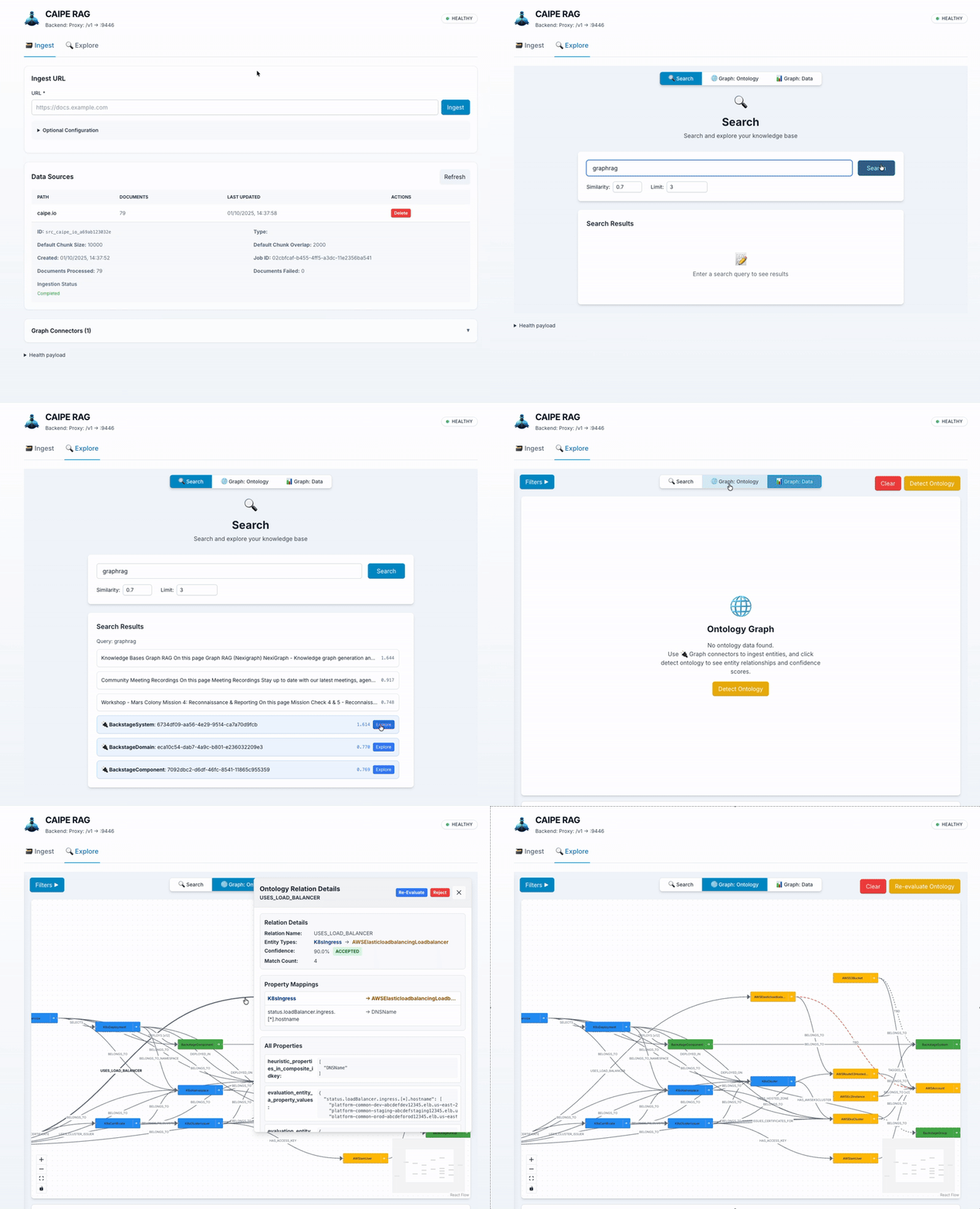
CAIPE RAG is an intelligent knowledge platform that combines vector-based retrieval and graph-based reasoning to provide comprehensive, contextually relevant information for AI agents and users.
The platform:
- Ingests data from multiple sources (web pages, AWS, Kubernetes, Backstage, Slack, Confluence, and more)
- Performs hybrid search combining semantic understanding with keyword matching
- Maintains a knowledge graph for entity relationships and complex reasoning
- Automatically discovers relationships between entity types using AI-powered ontology agents
- Exposes MCP tools for AI agents to search, fetch, and explore the knowledge base

Key Capabilities
Hybrid Search
CAIPE RAG uses a dual-vector approach for search:
- Semantic Search: Dense vector embeddings capture meaning and context
- Keyword Search: BM25 sparse vectors match exact terms and phrases
- Weighted Reranking: Configurable balance between semantic and keyword results
Knowledge Graph
When Graph RAG is enabled, the system stores structured entities in Neo4j:
- Entity Storage: Structured data with properties and relationships
- Graph Traversal: Explore entity neighborhoods and find paths between entities
- Automatic Splitting: Nested structures are split into connected sub-entities
Automatic Ontology Discovery
The Ontology Agent automatically discovers relationships between entity types:
- Uses fuzzy matching and LLM evaluation to identify valid relationships
- Runs in the background with configurable intervals
- Syncs discovered relationships back to the data graph
Documentation
| Page | Description |
|---|---|
| Architecture | System components, data flows, and technology stack |
| Ingestors | Overview of available data source integrations |
| Ontology Agent | Automatic relationship discovery system |
| MCP Tools | AI agent integration via Model Context Protocol |
| Authentication | Security concepts and RBAC overview |
Getting Started
Prerequisites
- Docker and Docker Compose
- Environment variables configured (see Server README)
Start All Services
# Clone the repository
git clone https://github.com/cnoe-io/ai-platform-engineering.git
cd ai-platform-engineering/ai_platform_engineering/knowledge_bases/rag

# Start all services using Docker Compose
docker compose --profile apps up
Access Points
| Interface | URL | Description |
|---|---|---|
| Web UI | http://localhost:9447 | Interactive search and graph visualization |
| API Docs | http://localhost:9446/docs | Swagger UI for REST API |
| MCP Endpoint | http://localhost:9446/mcp | Model Context Protocol for AI agents |
| Neo4j Browser | http://localhost:7474 | Graph database explorer |
Connect AI Agents
If you use Claude Desktop, VS Code with Copilot, Cursor, or other MCP-compatible tools, connect to the MCP server at:
http://localhost:9446/mcp
Supported Data Sources
CAIPE RAG includes ingestors for various data sources. See Ingestors for details.
| Source | Type | Description |
|---|---|---|
| Web Pages | Documents | Crawl sitemaps and web pages |
| AWS | Graph Entities | EC2, S3, RDS, Lambda, EKS, DynamoDB |
| Kubernetes | Graph Entities | Pods, Deployments, Services, CRDs |
| Backstage | Graph Entities | Service catalog entities |
| ArgoCD | Graph Entities | Applications, projects, clusters |
| GitHub | Graph Entities | Organizations, repositories, teams |
| Confluence | Documents | Space pages with incremental sync |
| Slack | Documents | Channel conversations and threads |
| Webex | Documents | Space messages |
Further Reading
- Architecture Overview - Detailed system design and data flows
- Server README - Configuration and deployment
- GitHub Discussion - Unified RAG design discussion